TL;DR
LinkedIn is a different platform in 2026 than it was two years ago. Here’s the short version of what you need to know:
- The feed is flooded with AI generated content, which means genuine, human writing is standing out more than ever. Authentic beats automated, every time.
- Events are now a top tier demand channel. LinkedIn just launched Off-Platform Event Ads, meaning you can promote any webinar, field event, or livestream in the LinkedIn feed and send people directly to your own registration page with no LinkedIn Event Page required.
- New targeting options including device type and device OS give you more control over who sees your ads and how.
- Thought Leader Ads remain the highest performing ad format on the platform.
- The B2B Institute’s 2026 research makes the case for LinkedIn better than anything else out there. If you need to justify the LinkedIn budget internally, start there.
- Clay has become the operating system for LinkedIn ABM. Dynamic account lists, signal based targeting, and automatic audience syncs are now table stakes for serious programs.
- Attribution is no longer LinkedIn’s weak spot. Tools like Factors.AI are finally giving teams the pipeline data they need to prove ROI.
What’s new on LinkedIn in 2026? Quite a bit, actually!
This guide covers the platform updates that actually matter, what’s working in paid and organic, and the tools serious B2B marketers are leaning on right now.
You can also check out the 2026 LinkedIn Organic Playbook, to learn what’s actually working now and how it accelerates your paid strategy.
What’s Changed with LinkedIn Marketing in 2026?
LinkedIn marketing has shifted in a few meaningful ways this year. Here’s what’s actually different:
AI-generated content has flooded the feed. Everyone has access to the same tools, and a lot of people are using them to publish at scale.
The result is a feed full of generic, interchangeable content. But, this is actually great news for brands willing to invest in real human perspectives.
Authentic, specific and experience driven content is standing out more than ever precisely because there’s so much noise around it. And if you’ve noticed AI written posts performing worse in search lately, you’re not imagining it.
Marketers are using Claude Code with the LinkedIn Ads API. Technical marketers and growth teams are building custom reporting, automated campaign management, and creative testing workflows directly against the LinkedIn Ads API using Claude Code.
This is opening up capabilities that weren’t accessible without a developer. We covered this in depth in our YouTube video and blog post.
Attribution has gotten significantly better. Historically, LinkedIn’s impact was hard to prove past the last click.
New tools like Factors.AI are giving revenue teams much clearer visibility into how LinkedIn touches pipeline across long B2B sales cycles.
The conversation with leadership about LinkedIn ROI is a lot easier when you have the data to back it up.
How Much Does It Cost to Advertise on LinkedIn? (2026 Benchmarks)
LinkedIn ad costs have changed in 2026. Here’s where benchmarks currently stand:
- Minimum daily budget: $10 per campaign (though $3,000–$5,000/month is the realistic floor for generating meaningful data)
- Cost per click (CPC): $5–$12, up roughly 8–12% YOY
- Cost per 1,000 impressions (CPM): $30–$60 (median ~$31); higher in competitive verticals like SaaS and Financial Services
- Cost per lead: $50–$130 via Lead Gen Forms; $150–$250+ via landing pages. Breaks down by offer type: ~$45 gated content, ~$55 webinars, ~$115 demo requests, ~$150 contact sales
- Message Ads (Sponsored InMail): $0.50–$1.00 per send
- Video Ads: $0.02–$0.15 per view (3+ seconds)

LinkedIn remains the only paid channel delivering positive ROAS for B2B in 2026. For benchmarks across industries, the Factors.AI LinkedIn Ads Benchmark Report and DreamData’s LinkedIn Ads B2B Benchmarks are both worth bookmarking.
New ways to Promote Posts on LinkedIn
LinkedIn offers two ways to promote content: boosting existing posts from your feed or boosting through dedicated ad campaigns.
We recommend boosting posts using the dedicated ad campaigns approach so that you have full control over the targeting and bidding options.
Boosting amplifies organic posts you’ve already published to reach a larger audience:
- Navigate to your post. Find the post you want to boost on your profile or company page.
- Click “Boost.” You’ll see a Boost button below the post (available for both personal and company page posts).
- Set your budget. Choose how much you want to spend. Minimum is typically $10/day.
- Select your audience. Target by location, job title, industry, company size, and other professional attributes.
- Choose duration. Decide how long you want the boost to run (1–30 days).
- Launch! Review and submit. Your post will start reaching a broader audience within hours.
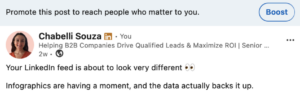
Tip 💡: Boosting works best for posts that are already performing well organically, event promotions, company announcements, or content that generated strong engagement.
Creating Dedicated Ad Campaigns
For more control and better performance, create campaigns in Campaign Manager instead of boosting. This is the recommended method:
- Better targeting options: Access to Matched Audiences, retargeting, and advanced filters
- Detailed analytics: Track conversions, segment performance, and ROI
- Budget control: Set lifetime budgets, bid strategies, and pacing
Tip 💡: For more hands on LinkedIn marketing, skip the boost button and use Campaign Manager. You’ll get better results for the same budget.
LinkedIn Posts Best Practices for 2026
Great content is the foundation of LinkedIn marketing success, whether it’s organic or paid.
Format for readability. Use short paragraphs, line breaks, and white space. Hook readers in the first line before the “see more” cutoff.
Post consistently. 3–5 times per week will do the trick. The algorithm rewards consistent creators.
Lead with value. Share insights, frameworks, and actionable advice.
Use media strategically. Posts with images get 2x engagement. Native video and carousel posts (PDFs) are performing well in 2026.
Write like a person. With AI generated content saturating the feed, posts that reflect a genuine point of view, specific experience, or contrarian take are getting disproportionate reach.
Generic advice gets scrolled past and the same applies to SEO. AI generated posts are reportedly getting penalized in search rankings. Human writing isn’t just better for engagement, it’s better for discovery.
Engage before you post. Spend 10–15 minutes commenting on others’ content before posting your own. This warms up the algorithm.
Avoid external links in posts. LinkedIn suppresses reach for posts with links. Put links in the first comment instead.
Tip 💡: For a deep dive on content strategy, check out our complete LinkedIn content guide or LinkedIn Organic Social Webinar
New LinkedIn Ads Targeting Options in 2026
LinkedIn has rolled out several targeting options this year that are actually new, not just repackaged features from prior years.
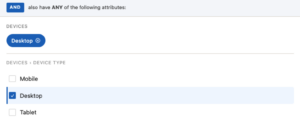
Targeting by Device Category: One of the more quietly useful additions. You can now target by Device Ty
pe (Mobile, Desktop, Tablet) and Device OS.
For campaigns where your landing page or demo ex
perience is built for a specific device, or where you know your buyers are working from desktop, this is something worth using!
Beyond device targeting, LinkedIn has expanded its targeting suite in several other ways in 2026.
See the full breakdown in this LinkedIn post for screenshots and examples of each new option.
Events on LinkedIn: A Major 2026 Trend
Events have become one of the highest leverage channels on LinkedIn in 2026.
Off-Platform Event Ads (New in 2026)
Until recently, every Event Ad required a LinkedIn Event Page as the destination, meaning you had to rebuild your event inside LinkedIn’s ecosystem to access the format’s features.
Marketers can now create an Event Ad using a 3rd party URL, add event details, and choose from objectives including awareness, engagement, traffic, or lead generation.
Clicks send users directly to the external event page, while performance metrics remain trackable in Campaign Manager.
According to LinkedIn’s own data, 62% of B2B marketers say events are one of the most essential tactics for delivering full-funnel outcomes.
The platform is betting big on becoming the primary promotional channel for event driven demand generation, not just for LinkedIn native events, but for everything on your event calendar.

Inviting Connections to LinkedIn Events
On the organic side, LinkedIn allows both organizers and attendees to invite up to 1,000 first-degree connections per week to a LinkedIn Event.
This limit applies across events and doesn’t increase if you’re running multiple. It’s a meaningful distribution tool, particularly for companies whose employees collectively have large networks.
Think about it this way: a coordinated push from five employees with active networks can generate real attendance numbers without spending a dollar.
Clay & LinkedIn Ads Integrations
Clay’s LinkedIn Ads integration lets you build a targeting command center that pulls in data from across your tools.
Funding rounds, job change alerts, CRM activity, and enrichment providers like Apollo all feed into dynamic account lists that automatically sync to LinkedIn Audiences. As signals change, your audience updates with them.
Here’s how teams are setting it up:
- Connect your signals. Bring your data sources into Clay including intent data, job postings, funding activity, and whatever matters most to your ICP.
- Build dynamic lists. Set the rules once and accounts move in and out automatically as signals change.
- Sync to LinkedIn Matched Audiences. Your lists push directly to LinkedIn so your targeting stays fresh.
- Layer job criteria. Stack account targeting with job title, seniority, or function filters to reach the right person at the right company.
- Track account engagement. See which accounts are interacting with your ads and feed that signal back to sales.
For teams running ABM programs, Clay.com has become the go to operating system for GTM signals and list management. It’s particularly useful for keeping your LinkedIn audience lists fresh with signals from across the web.
Contact Targeting
Upload specific individuals (email addresses or LinkedIn profile URLs) to target exact decision-makers. Perfect for high-value enterprise deals where you know exactly who the buyers are.
- Maximum precision: Reach the 15 people on your champion list at a $50M target account.
- Retargeting: Follow up with people who attended your webinar, downloaded content, or visited key pages.
- Multi-threading: Ensure all decision-makers in the buying committee see your message.
Thought Leader Ads on LinkedIn
Thought Leader Ads continue to be the top performing ad format on LinkedIn and a must for your ads strategy. TLAs let you promote posts from employees’ personal profiles as ads. This is powerful because content from people (not company pages) gets 5-10x more engagement.

How Thought Leader Ads Work
- An employee creates a post. A company executive or subject matter expert publishes a post from their personal profile.
- The company sponsors it. The company promotes that personal post as an ad through Campaign Manager.
- Authentic reach. The ad appears as if it’s from the individual, not the company, which drives higher engagement.
Best use cases: CEO insights, founder stories, employee perspectives, or subject matter expert content that benefits from personal credibility.
You can learn more about Thought Leadership HERE.
The B2B Institute’s 2026 Trends Reports
LinkedIn’s B2B Institute is one of the best free research resources available to B2B marketers.
Their work on B2B buying behavior, brand building, and the long-term economics of marketing consistently goes deeper than anything you’ll find. Their 2026 Trends Reports are worth reading in full.
And if you’d rather hear it explained with context, we recently had Danielle from the B2B Institute on the podcast to walk through what the research actually means for practitioners. Listen to that episode here.
More Resources to Keep On Hand
Here’s a shortlist of the tools and communities worth following to learn more about LinkedIn marketing:
- Speedwork Podcast + YouTube: We cover LinkedIn ads strategy, campaign breakdowns, and AI updates.
- LinkedIn B2B Institute: LinkedIn’s own research arm. Their reports on B2B buying behavior and brand building are some of the best free resources available.
The Bottom Line
LinkedIn marketing in 2026 requires a multi-faceted approach: consistent organic content, strategic paid advertising, account-based targeting, and proper measurement infrastructure.
Most companies fail because they treat LinkedIn as just another social platform. The winners understand it’s a business development tool that happens to look like social media.
Whether you’re spending $5K/month or $100K/month, success comes down to targeting precision, content quality, and relentless optimization.
Need help building a LinkedIn marketing strategy that actually drives pipeline? Book a free consultation with our team.
Work With the LinkedIn Experts
Speedwork is a LinkedIn ads certified marketing agency.
We run LinkedIn Ads, outbound lead generation, and organic social for SaaS, technology, professional services, and other B2B businesses that need to reach professional buyers at scale.
We have managed over $100M in LinkedIn ad spend across 300+ companies, and we have helped clients go from a handful of leads per month to hundreds per week.
Our process is built around precise targeting, full funnel campaign strategy, and continuous optimization.
If LinkedIn is your best channel for reaching decision makers and you want an expert team running it, let’s talk. You can also see our results and learn about our process before reaching out.
FAQs
How much does it cost to advertise on LinkedIn? LinkedIn advertising costs $5-12 per click, $30-80 per 1,000 impressions, and $50-150 per lead for most B2B campaigns. Minimum daily budget is $10 per campaign, but $50-100 is recommended for meaningful results. Message Ads cost $0.40-0.80 per send. While more expensive than other platforms, LinkedIn delivers higher-quality B2B leads.
How do I promote a post on LinkedIn? To promote a LinkedIn post, click the “Boost” button below any post from your profile or company page. Set your budget (minimum $10/day), select your target audience (location, job title, industry, company size), choose duration (1-30 days), and launch. For better control and results, create campaigns in Campaign Manager instead.
What are LinkedIn best practices for posts? LinkedIn post best practices include: posting 3-5 times weekly consistently, hooking readers in the first line, using short paragraphs with line breaks, adding images or video, avoiding external links (put in comments), engaging with others before posting, leading with value not promotion, and writing with a genuine point of view rather than generic AI-sounding content.
What is LinkedIn account-based marketing? LinkedIn account-based marketing (ABM) lets you target specific companies and decision-makers with ads. Upload target account lists (up to 300,000 companies) or contact lists (specific individuals), layer on job criteria, and show personalized ads only to people at those accounts. Perfect for enterprise sales with defined target account lists.
What are Thought Leader Ads on LinkedIn? Thought Leader Ads promote posts from employees’ personal profiles as sponsored ads. Executives or subject matter experts create posts from personal profiles, then companies sponsor those posts through Campaign Manager. They appear as personal content (not company ads), typically achieving 2-3x higher engagement than standard company page ads.