TL;DR: Your profile is the landing page for every post you publish. Fix it before you post more. Name your buyer in the headline, tie your About section to a problem they feel, show proof, and put a lead magnet and one clear CTA where visitors will see them. Then record a baseline so you know whether your content produces pipeline or just impressions.
Most founders we work with are closer than they think: the posts are already strong, and a few profile fixes are all it takes to turn that attention into pipeline. Without them, a post earns the click, the visitor lands on “Founder & CEO | Entrepreneur | Innovator,” and leaves without knowing what the company sells.
That’s why we audit the profile before we touch the posting cadence. Every post sends traffic to one place. If that place doesn’t explain what you do and give visitors something to take, more posting just means more wasted visits.
Here are the 10 fixes we make, in the order we make them.
Why fix your profile before scaling organic?
Your content earns attention and your profile decides what happens to it.
The person who clicks through is rarely the only buyer. They’re part of a buying group, and the people in finance, ops or procurement who never comment on your posts still check your profile before a deal moves. The 2025 Edelman-LinkedIn B2B Thought Leadership Impact Report found that 55% of these hidden buyers use thought leadership to evaluate vendors.
Those people won’t message you to ask what your company does. If your profile doesn’t tell them, they move on.
Thought Leader Ads put spend behind a founder’s posts, so every click lands on the profile.
→ Learn how Thought Leader Ads work and how to maximize results
1. Start with the people you want to reach
When we audit a founder profile, the first thing we check is whether a stranger could name the founder’s buyer in five seconds. Most of the time, they can’t.
Before you rewrite anything, answer three questions:
- Who do we most want to reach?
- What problem are they trying to solve?
- What outcome do they want?
Then write one sentence:
We help [audience] solve [problem] through [approach].
For example:
We help B2B SaaS customer success teams organize onboarding handoffs so customers activate faster.
That sentence is your filter. If your headline, About section or content topics don’t support it, rewrite them until they do.
Run multiple businesses or speak to several audiences? Pick one for the headline. Put the rest in About and Experience. A headline that tries to cover everything says nothing.
2. Write a headline that names your buyer
“Founder & CEO | Entrepreneur | Innovator” is the headline we rewrite most often. It gives visitors your title and nothing about whether you’re relevant to them.
A headline that does its job names your company, your buyer and your topics:
Founder at [Company] | Customer onboarding software for B2B SaaS teams | Writing about activation and implementation
That’s three cues in one line: what you lead, who you serve, and what you post about. Use your buyer’s words, not your internal jargon, and put the most important part first.
The test: if someone in your target audience reads your headline and still has to guess what you sell, it isn’t done.
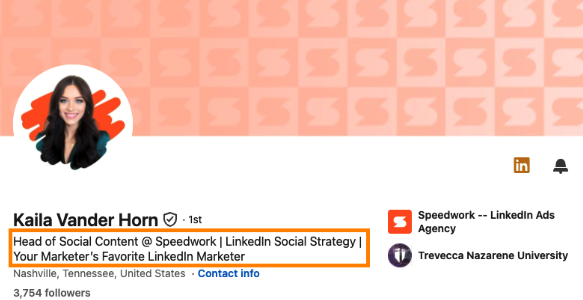
A headline that names the company, the specialty and the audience.
3. Give your photo and banner a job
Use a current headshot that looks like you do on a video call. People should be able to match the face in their feed to the person on the sales call.
The banner is the most underused space on a founder profile. Give it one job: a positioning statement, a proof point you’re cleared to share, or your URL. Not a stock city skyline.
For example:
Helping B2B SaaS teams build a clearer path from kickoff to activation.
Preview it on desktop and mobile. LinkedIn crops banners differently across screens, and your profile photo covers part of it. Make sure the message survives both.
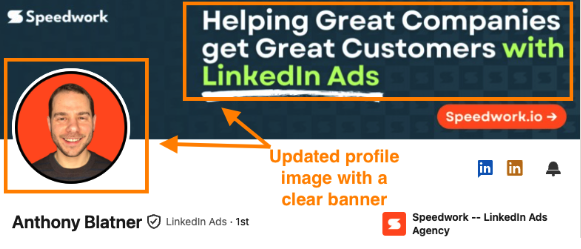
An updated profile photo paired with a banner that has one clear message.
4. Write an About section that sounds like you
Your About section should read like you explaining your company to a peer over coffee, not like a press release.
The structure we use:
- Open with a problem your buyer recognizes.
- Say what your company does and who it serves.
- Share the experience that shaped your approach.
- Show specific, verified proof.
- Give one clear next step.
For example, you might open with:
Customer onboarding breaks when sales, implementation and customer success work from different information. I founded [Company] to bring those handoffs into one workflow for B2B SaaS teams.
Then add what only you know: what you saw in the industry, why you built the company, what customers get wrong about the problem. That’s what makes it credible.
When you cite results, give them context. Say what was measured, when, and whether it was your work, your team’s or a customer’s. A vague number does more damage than no number.
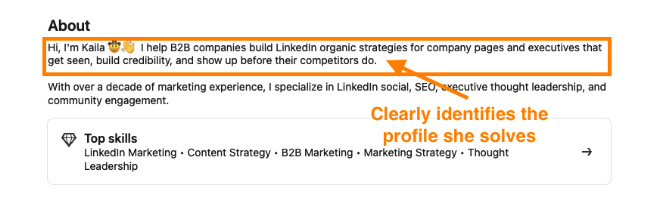
The first line of the About section names who she helps and the problem she solves.
5. Use Featured to guide the next click
Featured is where an interested visitor decides whether to go deeper. Treat it like a shelf with three items:
- A resource on a problem your buyer has right now
- A customer example that shows how you work
- A product walkthrough or consultation page for people ready to talk
Title each item so visitors know what they’re getting. “A guide to smoother onboarding handoffs” beats “New resource.” Put your strongest item first and refresh the section every quarter.
No case study yet? Feature a product demo, a guide or a walkthrough of your methodology. Show how you think.
This is worth the effort. The same Edelman-LinkedIn report found that 95% of hidden buyers say strong thought leadership makes them more receptive to sales and marketing outreach.
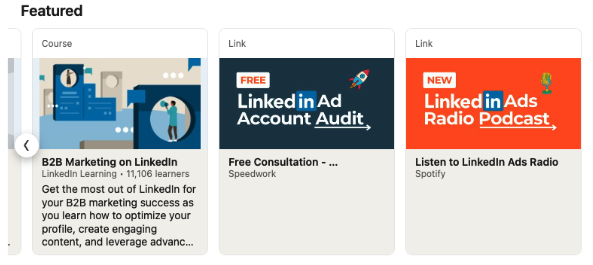
A Featured section with a resource, a free audit offer and a podcast.
6. Add a lead magnet that turns visits into leads
Most founder profiles stop at “book a call.” That works for the small slice of visitors ready to buy today. Everyone else leaves, and you never learn who they were.
A lead magnet gives those visitors a reason to raise their hand now. Its job is simple: convert profile traffic into leads. Pin it in Featured and list it at the top of your About section, where it shows before the “see more” cut.
A good lead magnet:
- Solves one specific problem your buyer has today
- Is fast to use: a checklist, template, grader or tool beats a 40-page ebook
- Leads naturally to what you sell
Here’s what we put on our own profiles:
- Get Ads2Go: LinkedIn Ads for Mobile
- Get an ads audit: LinkedIn Ads Audit
- Grade your LinkedIn Ads: Free Ads Grader
- Claude Code <> LinkedIn Ads API: Connect Claude Code and LinkedIn Ads
If you only have one, lead with it. If you have none, build one before you scale content. It’s the difference between an audience and a pipeline.
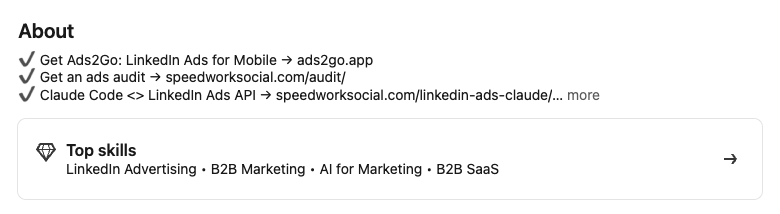
Lead magnets listed at the top of the About section, where they show before the “see more” cut.
7. Give your experience and recommendations context
Your current role should say what the company does, who it serves and what you own as founder. Past roles matter when you connect them to the current work. “Ten years running implementation teams” explains why you built an onboarding product. A list of titles doesn’t.
The same goes for achievements. Say what was measured, when, and whose work it was.
For recommendations, ask people to describe a specific situation, what you did and what changed. “Great to work with” tells a buyer nothing. A recommendation that names the problem, the fix and the result tells them what working with you looks like.
8. Make the next step obvious
Pick one primary action: try the product, grab the lead magnet or book a call. Then point your About section, Featured section and banner at it.
Click every link on your profile from your phone. Broken links, dead forms and booking pages that don’t load on mobile are some of the most common problems we find in audits.
For example:
If onboarding handoffs are slowing your team down, grab our handoff checklist in Featured.
9. Connect your profile and your content
Your profile previews your content, and your content sends people to your profile. Both should point at the same buyer and the same topics.
Pick three or four content pillars that match your work and your buyers’ questions: lessons from the field, customer questions, founder stories, documented examples. Set a cadence your team will actually sustain, and decide who drafts, who approves and who replies to comments. A slower cadence you keep beats an aggressive one you abandon in week six.
10. Track the signals that matter
Record a baseline before you change anything: profile views, engagement from people in your ICP, website visits from tagged links, lead magnet downloads, qualified conversations and meeting requests.
Log every change as you make it: cadence, topics, campaigns. When someone reaches out, ask what made them do it. That answer tells you more than a dashboard.
Review after 30 days. Profile views tell you people are looking. Lead magnet downloads and meeting requests tell you the right people are acting. Optimize for the second set.
LinkedIn profile checklist for B2B founders
Before you scale your organic activity, check that:
- Your target buyer is clear.
- Your headline names who you serve.
- Your photo and banner are current and readable on mobile.
- Your About section covers the problem, approach, experience, proof and next step.
- Your Featured section is current and leads with your strongest item.
- A lead magnet captures visitors who aren’t ready to talk yet.
- Your experience section supports your positioning.
- Your claims are accurate and clearly attributed.
- Every link works on mobile.
- Your content topics match your profile.
- If you run Thought Leader Ads, your profile is ready for paid traffic.
- You’ve recorded baseline metrics.
Frequently asked questions
What should a B2B founder include in their LinkedIn headline?
Your role, your company, who you serve and what you post about. Use your buyer’s language and put the most important part first.
What belongs in a founder’s Featured section?
A resource on a problem your buyer has, a customer example or methodology walkthrough, a lead magnet, and a product or consultation page. Title each one clearly and lead with the strongest.
How can a founder show credibility without case studies?
Feature a product demo, explain your methodology, highlight relevant experience, and ask for recommendations that describe a specific situation and result.
Should you update your profile before posting consistently?
Yes. Every post sends people to your profile. Fix it first, or you’ll earn attention with your time (or your ad budget) and lose it at the click.
How do you know if profile changes are working?
Record a baseline, then track profile views, ICP engagement, tagged website visits, lead magnet downloads, qualified conversations and meeting requests. Ask inbound leads what prompted them to reach out.
Fix the profile, then scale the content
Your profile is where your content’s attention turns into pipeline, or doesn’t. Get the positioning, proof and next step right before you post more, and before you put ad spend behind a founder’s posts.
Want us to audit your founder’s profile before you scale? Book a free consultation with Speedwork and we’ll walk through your audience, positioning, and organic and paid strategy.